If you receive an SMS or WhatsApp message informing you of an electronic traffic fine and asking you to click a specific link immediately, do not trust it right away. You must check and verify it first.
This is because many Indonesians have fallen victim to scams or had their phones hacked after clicking links or accidentally downloading applications sent by scammers via SMS or WhatsApp.
To help you avoid these issues, we will provide a summary of how to check and pay the latest electronic traffic fines (ETLE) based on the official guide from the Indonesian National Traffic Police (Korlantas POLRI).
What is an Electronic Traffic Fine (ETLE)?
ETLE (Electronic Traffic Law Enforcement) is a digital and camera-based traffic law enforcement system utilized by the Indonesian National Police. This national electronic ticketing system was officially implemented on September 22, 2022, although its rollout has been gradual across various regions since its initial launch phase in March 2021. This system is fully active, monitoring violations 24 hours a day, every day.
The camera records violating vehicles, and the vehicle data is then verified against the motor vehicle registration database.
Once the violation is validated, the vehicle owner will usually receive a physical ETLE confirmation letter sent to the address listed on the STNK (Vehicle Registration Certificate). In some regions, notifications may also be sent via official SMS or email linked to the ETLE system.
Because the process is digital, drivers are not immediately stopped by officers on the road. All verification, confirmation, and payment processes are conducted electronically.
How to Check Electronic Traffic Fines
Before paying a traffic fine, the most crucial first step is to ensure that the notification you received is entirely official.
Do not instantly trust SMS messages or links sent by unknown numbers. Always verify through the official ETLE website (konfirmasi-etle.polri.go.id) or the Indonesian Prosecutor's Office website (tilang.kejaksaan.go.id).
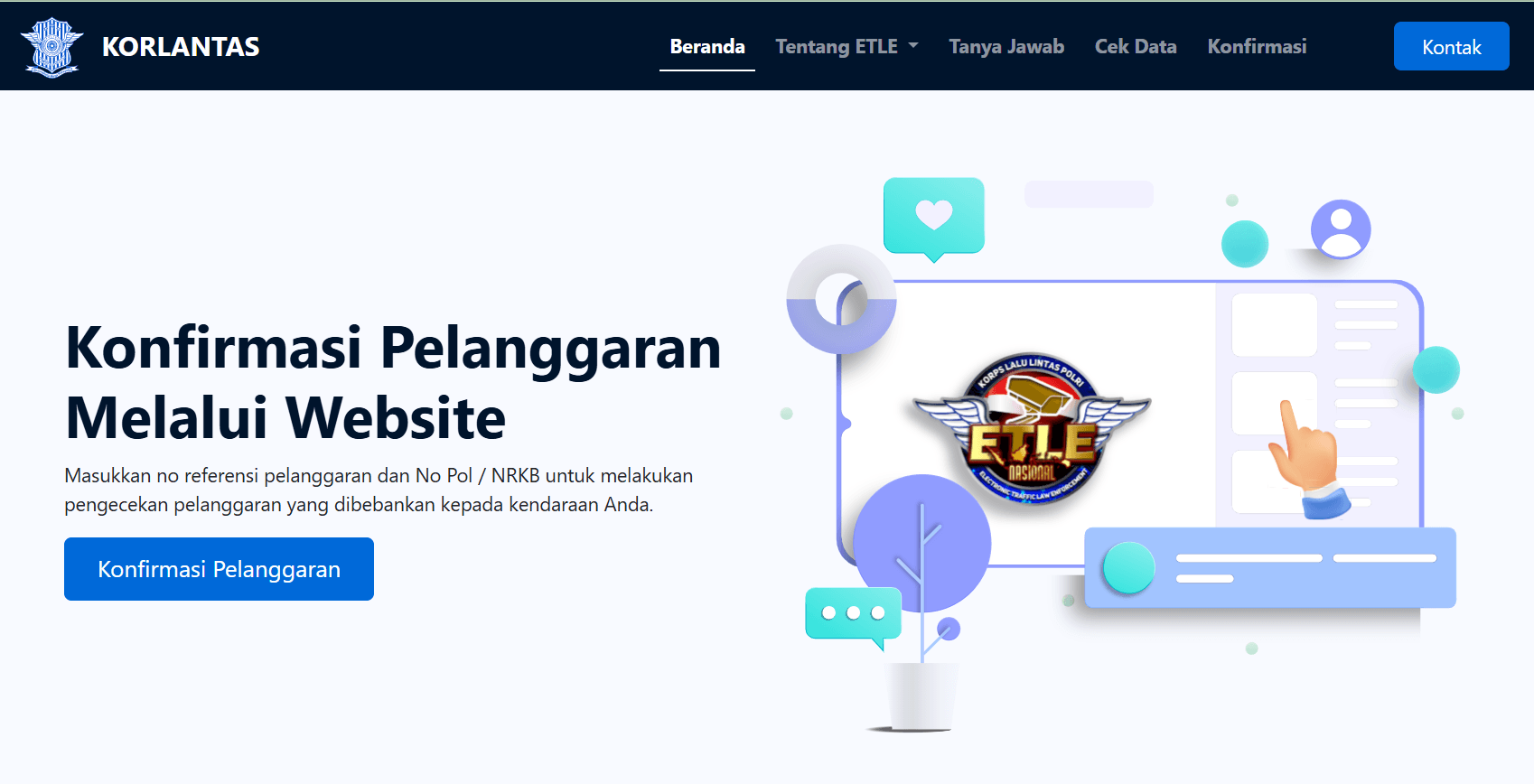
How to Check ETLE Fines via the Korlantas POLRI Website
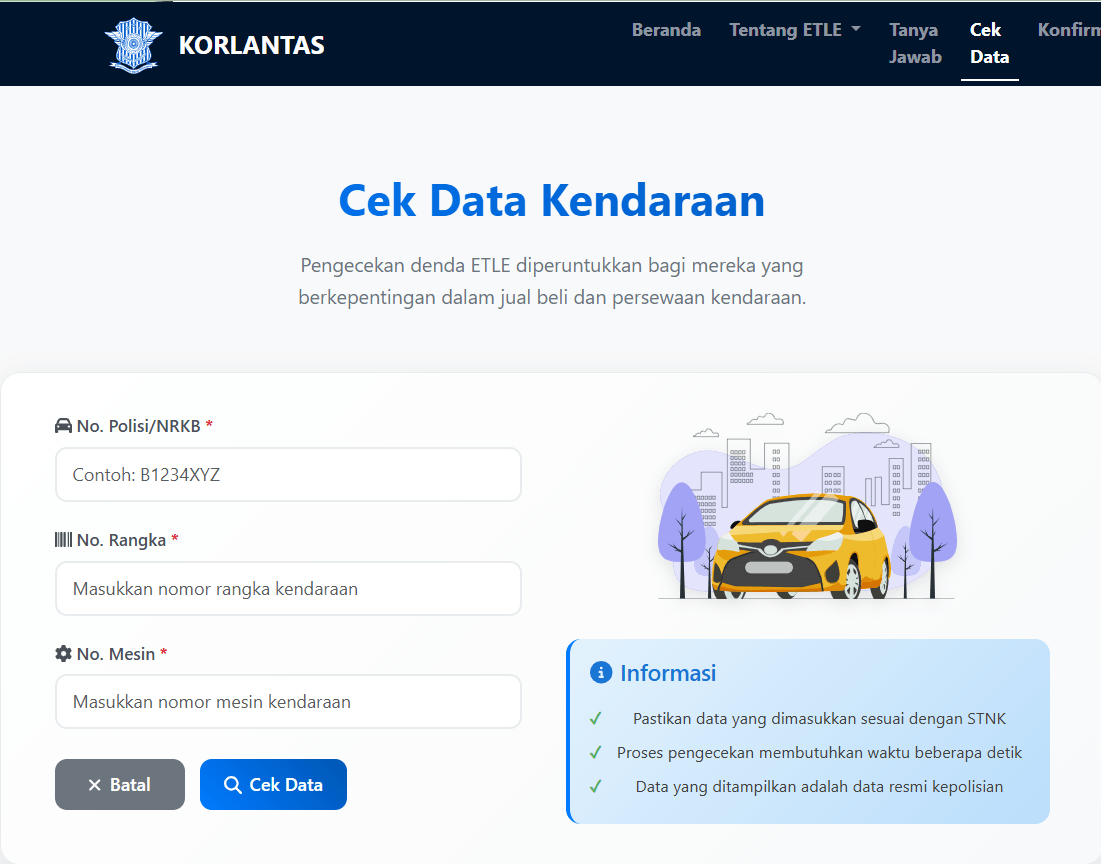
Source: https://konfirmasi-etle.polri.go.id/cek-data
You can check by following these steps:
- Open the official National ETLE website or copy and paste the following link directly: konfirmasi-etle.polri.go.id/cek-data.
- Enter your vehicle's license plate number.
- Enter your vehicle's frame number and engine number.
- Then, click the "Check Data" (Cek Data) button.
- If the vehicle has an ETLE violation, the system will display detailed information about the violation, including the time and location of the incident.
Typically, photographic evidence of the vehicle will also appear, allowing you to confirm the validity of the violation.
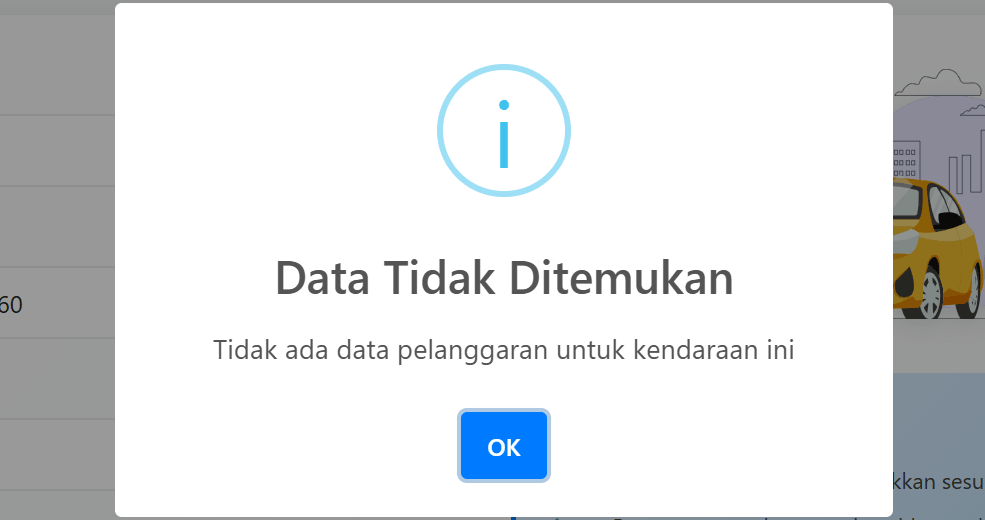
If there is indeed violation data for your vehicle, the next step is to confirm it on the confirmation page: konfirmasi-etle.polri.go.id/konfirmasi.
The ETLE confirmation process is crucial and must be completed within 8 days of the violation. This confirmation aims to verify whether the vehicle is still yours and who was driving it when the violation occurred.
How to Confirm ETLE Fines via the Website
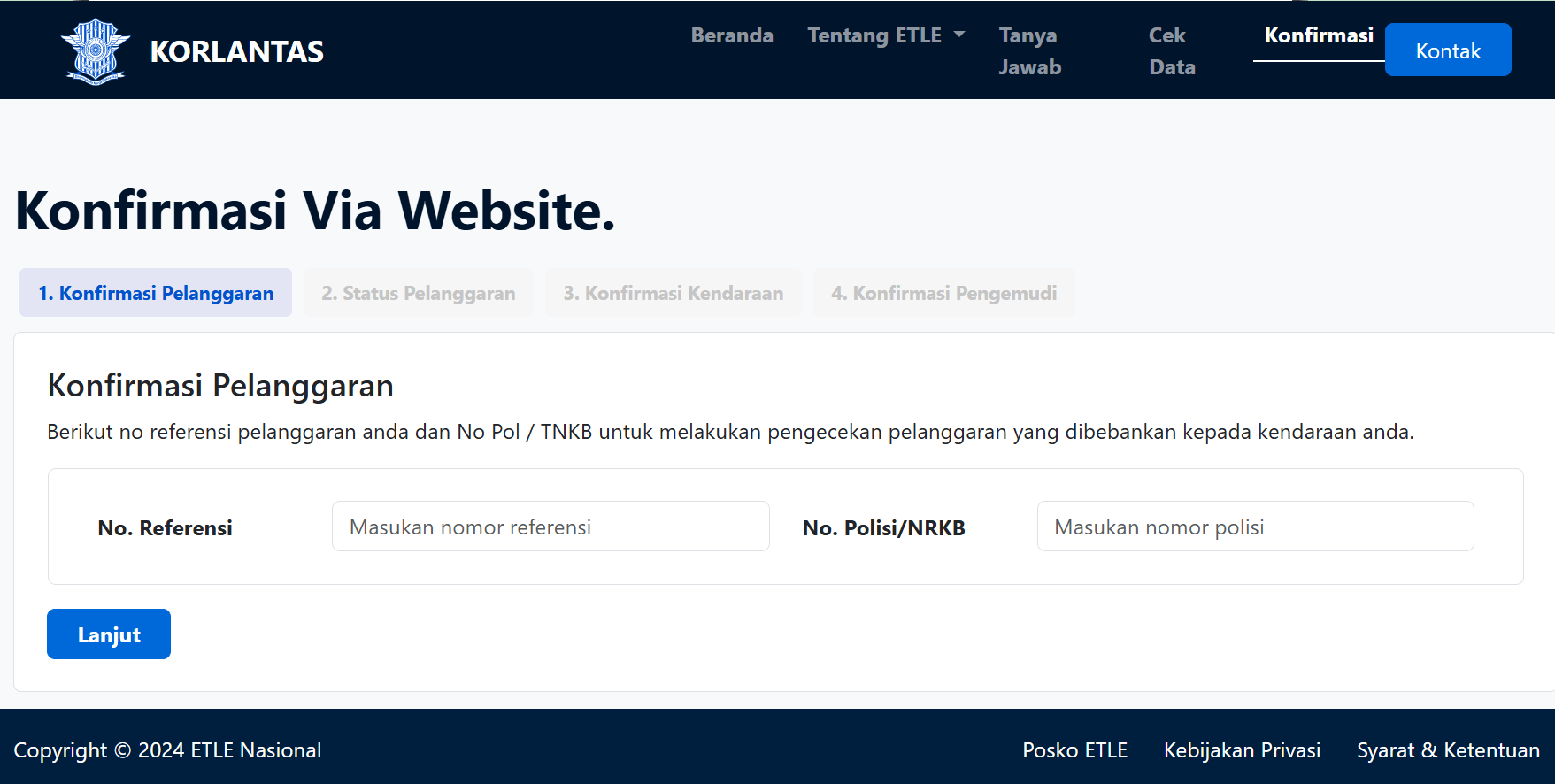
Source: https://konfirmasi-etle.polri.go.id/konfirmasi
In the ETLE confirmation process via the official website, you need to go through 4 confirmation stages:
- Violation Confirmation
- Violation Status
- Vehicle Confirmation
- Driver Confirmation
The reference number is a unique code you receive via the confirmation letter on the third page. The Motor Vehicle Registration Number (NRKB) is a unique identifier consisting of a combination of letters and numbers provided by the Indonesian National Police as proof of vehicle registration.
This process is particularly important if the violating vehicle has been sold but is still under your name, OR if the violating vehicle is using your license plate number.
By confirming and providing information, you are participating in the effort to regulate vehicle ownership. In the worst-case scenario where the vehicle in question is used for criminal acts, you have helped facilitate the investigation.
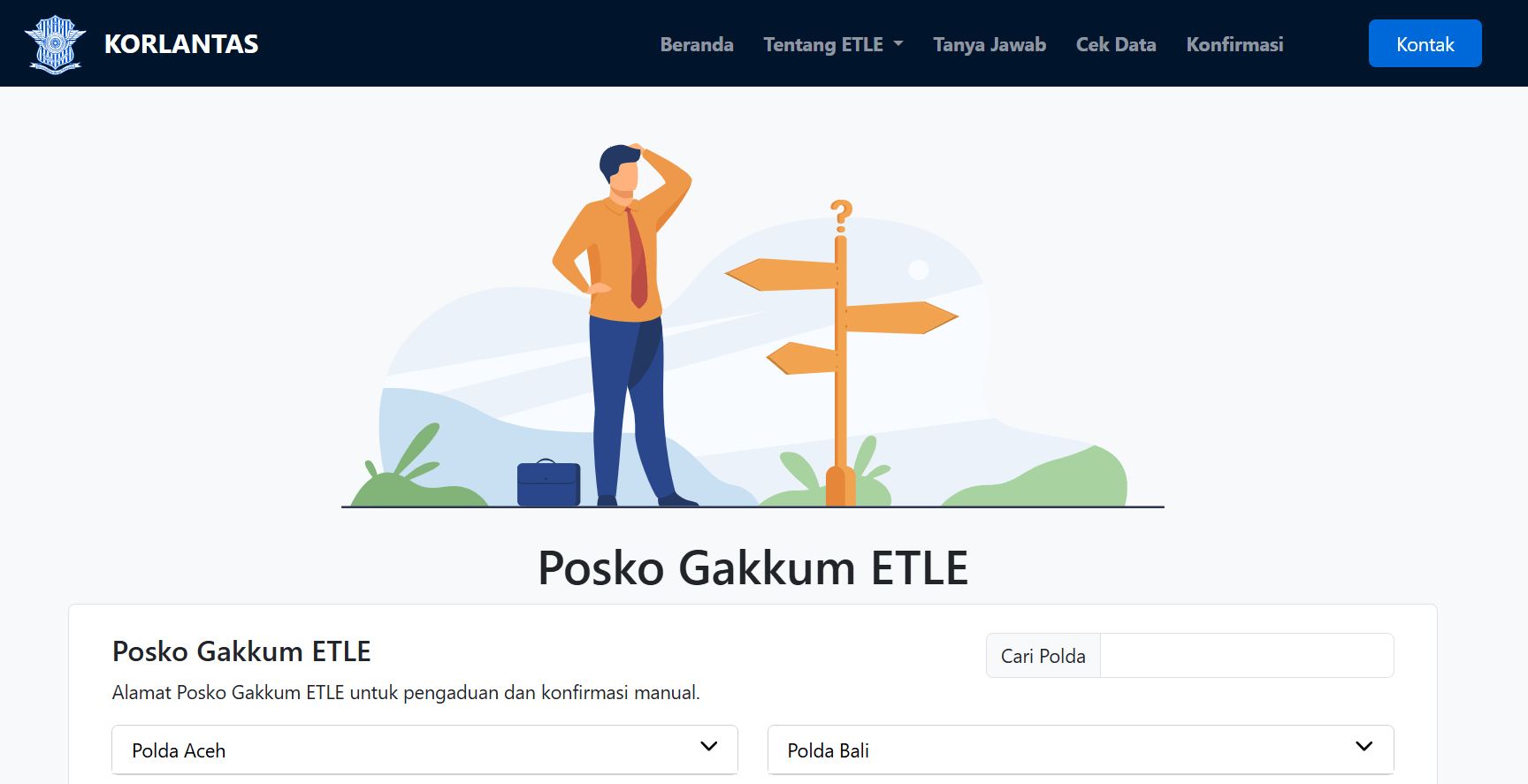
How to Confirm ETLE Fines at the ETLE Gakkum Post
Source: https://konfirmasi-etle.polri.go.id/posko-etle
The ETLE Gakkum (Law Enforcement) Post is a center for validation, confirmation, and processing of electronic traffic fines by the police. At this location, traffic violators caught by ETLE cameras can confirm vehicle data, receive traffic fine letters, and handle STNK blocking.
To find the address of the nearest Gakkum post in your province, copy and paste this link: konfirmasi-etle.polri.go.id/posko-etle and search for the regional police (Polda) corresponding to your province.
Mandatory Documents to Bring:
- Original ETLE Confirmation Letter sent to your home.
- Original & photocopy of STNK.
- Original & photocopy of the vehicle owner's ID card (KTP).
- Original & photocopy of the driver's license (SIM) (the SIM belonging to the person driving during the violation).
Visit the nearest Ditlantas Polda or Satlantas Polres Gakkum Post indicated on your confirmation letter. Operating hours usually follow working hours (Monday–Friday, 08:00–15:00 WIB).
Why Should You Check Through the Official Website?
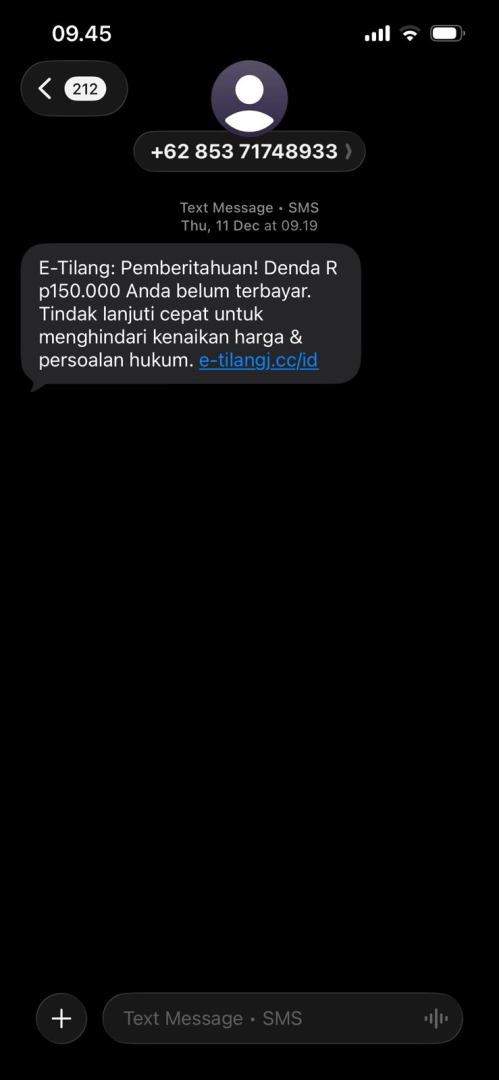
You must, and are indeed obligated to, check electronic traffic fines through official websites because there are currently many ETLE scam methods circulating via SMS, WhatsApp, or fake emails.
Source: Personal
Usually, scammers will send messages such as:
- "You have an electronic traffic fine"
- "Click the following link to view evidence of the violation"
- "Pay immediately to avoid price increases"
However, these links direct you to fake websites designed to steal victims' personal or banking data.
In some cases, victims are directed to input credit card data or mobile banking OTPs. Some victims have even lost access to their bank accounts after opening a fake ETLE link.
Therefore, there are several characteristics of fake ETLEs that you must be wary of:
- The website domain does not use an official government domain such as .go.id.
- The link looks strange or uses a short URL.
- The message asks you to download an APK.
- The fine amount is immediately requested to be transferred to a personal account.
- There is no photographic evidence of the vehicle violation.
If in doubt, do not click on any link. It is safer to open the official ETLE or Prosecutor's Office websites manually through a browser.
How to Pay Electronic Traffic Fines
After ensuring the violation data is valid, you can proceed to the payment stage. Generally, the ETLE system will issue a payment code or BRIVA (BRI Virtual Account) after the violation is confirmed.
Paying traffic fines is now much more accessible as it can be done online without having to go to court.
Paying ETLE Fines Using a BRIVA Code
If you receive a BRIVA code (usually a series of 15 digits), the fastest method is to use the BRImo application. However, you can also pay it from other banks.
Using the BRImo Application
- Open the App & Login: BRImo.
- Open the BRImo application on your phone, enter your username and password, or use the biometric feature (fingerprint/Face ID) to log in.
- Select the BRIVA Menu: Payment Menu.
- On the main page (dashboard), select the "BRIVA" menu. If the menu is not immediately visible, click the "More" (Lainnya) button first, then look under the "Payment" (Pembayaran) category.
- Enter the BRIVA Number: Input the Billing Code.
- Click the "New Payment" (Pembayaran Baru) button at the bottom, then enter the 15-digit ETLE Virtual Account number you received. After that, press "Continue" (Lanjutkan).
- Data Verification & Confirmation: Final Stage.
- The phone screen will display information regarding the vehicle owner's name (matching the STNK), the traffic fine registration number, and the fine amount. If the data is correct, click "Pay" (Bayar), enter your BRImo PIN, and save the transaction receipt.
Alternative: Via Other Bank ATMs (BCA, Mandiri, BNI, etc.)
If you do not have a BRI account, you can still pay the BRIVA code through other bank ATM machines:
- Insert your ATM card and PIN.
- Select the Transfer menu -> Transfer to Another Bank.
- Enter the BRI bank code (002) followed by your 15-digit BRIVA number (Example: 00285301xxxxxxxxx).
- Enter the nominal fine according to what is stated on the letter or confirmation system (it must be exact, neither less nor more).
- The ATM screen will display vehicle data confirmation. If it matches, select Yes/Correct to complete the transaction.
Paying ETLE Fines Using a Prosecutor's Office Billing Code
If you are late in making the initial confirmation or choose to wait for a court decision, your fine must be paid through the Indonesian Prosecutor's Office system.
Steps to Obtain & Pay the Billing Code:
- Get the Billing Code First: Open the official website tilang.kejaksaan.go.id. Enter your traffic fine registration number or case file number, then click Search. The system will display the final nominal fine decided by the judge. Click the "Pay" (Bayar) button to display the Billing Code (MPN/Simponi Code).
- Pay via Tokopedia / E-Commerce:
- Open the Tokopedia application on your phone, then select the Top-Up & Bills menu.
- Scroll down until you find the Government Services category, then click State Revenue.
- Select the Online Tax / PNBP / KUA option.
- Enter the Billing Code you obtained from the Prosecutor's Office website earlier, then click Pay. You can complete the transaction using Gopay, OVO, or any bank transfer method.
- Pay via Other Mobile Banking (State Revenue Menu):
- Open your Mobile Banking app (e.g., Livin' by Mandiri, BCA Mobile, or BNI Mobile).
- Find the Payment menu -> State Revenue or Tax/PNBP.
- Enter the Prosecutor's Office Billing Code, verify the name that appears, then proceed with the payment until complete.
Important Notes After Paying:
Once your payment is successful, the transaction data will be automatically integrated into the Korlantas Polri database system. You no longer need to go to the police station or prosecutor's office to submit physical proof. The system will automatically unblock your vehicle's STNK within a maximum of 1x24 hours. Just save the digital receipt or transfer proof for your personal records.
Do not trust anyone who claims they can "reduce the fine" by asking for a personal transfer. Official ETLE payments always use virtual accounts or official government billing codes.
What Happens If ETLE Fines Are Not Paid?
If the violation is not confirmed or the fine is not settled, the vehicle data will be temporarily blocked in the police registration system.
The direct impact is that you will not be able to pay the annual Motor Vehicle Tax (PKB) or renew the STNK at SAMSAT before the ETLE fine obligation is settled.
Therefore, if you receive an official ETLE confirmation letter, it is best to verify it immediately and complete the process according to procedures.
Conclusion
Electronic traffic fines or ETLE do make the traffic law enforcement process more modern and practical. However, on the other hand, the public must also be more careful because there are many scam methods operating in the name of ETLE.
The safest way is to always check through official government websites, ensure the evidence of the violation is valid, and then make a payment using an official billing code or virtual account.
By understanding the correct procedure for checking and paying electronic traffic fines, you not only avoid vehicle administration problems but also stay safer from the risks of digital scams.
Get other useful information about tips and tricks on how to maintain a car only at chery.co.id.